Your Browser, Your Geopolitics
Purpose disclaimer: This post is less about “subverting a website’s UI decisions” and more about thoughtful product and design decisions. Specifically: why don’t more teams use contextual signals — like IP address, display language, or browser locale — to prevent unnecessary friction or even diplomatic headaches? The DIY script that follows is just an illustrative example.
South Korea’s e‑arrival system labeling Taiwan as “CHINA(TAIWAN)” is back in the news this week.
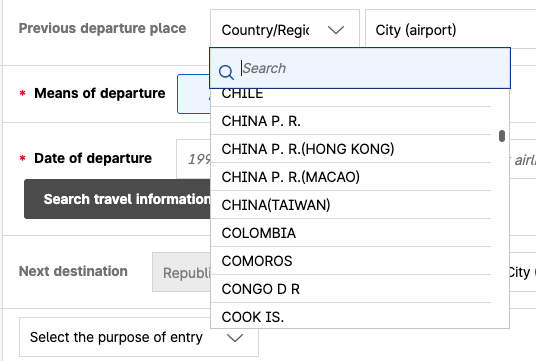
Sigh
After waiting long enough for an official response, Taiwan’s Foreign Ministry finally responded by downgrading South Korea’s designation in official documents from the formal “Republic of Korea” to the (I guess?) more casual “South Korea”, which, I suppose, is slightly less pointed than calling them “That Northeast Asian Country Taiwan Beat in the 2026 WBC.”
As the Focus Taiwan article notes:
Under pressure from Beijing, however, many organizations, countries and companies use the "China (Taiwan)" or "Taiwan (China)" designation on dropdown menus and in other places to support the PRC's propaganda that Taiwan is part of China.
Admittedly, as a resident I can say that’s preferable to the way I’ve seen some global organizations “finesse” this issue by omitting “Taiwan” as a choice altogether, effectively deplatforming the whole island.
Visible frustrations like this are one of the things I remember most about the early web. Twenty-five years ago, if a page annoyed you, you didn’t sigh and hope for policy changes or file tickets into an IT bureaucracy. You clicked View Source, poked around, and fixed it yourself! GreaseMonkey (primarily, at the time) let you turn those tweaks into reusable code: a tiny, local script running in your browser, quietly rewriting the page to suit you.
Today, that kind of direct tinkering (or “hacking”, in the classic meaning of the word) is far less common. Modern websites are built on sprawling frameworks, dozens of JavaScript libraries, minified and bundled goo, and dynamic rendering that can completely redraw elements at a millisecond’s notice. There’s rarely a single HTML element you can reliably target, and the source you see is often indecipherable.
But in geopolitical contexts like this, we’re often talking about dropdown lists — and dropdown lists are another story. Despite all the complexity under the hood, select menus and similar UI elements tend to have consistent classes, attributes, and text content that make them surprisingly hackable. In many cases, you can target them directly with a small script, just like we’re about to do here.
Enter the Monkey
That’s where Tampermonkey comes in. It’s the modern, more powerful, cross-platform heir to GreaseMonkey, letting you run small, local scripts in your browser to tweak pages after they load. For situations like this where you want to quietly correct a label or change text in a dropdown, it’s simple, safe (as long as you control the script; more on that in a second), and remarkably effective, even on sites that are otherwise over-engineered and heavily JavaScript-driven.
And fortunately, the Korean e-arrival page isn’t all that complicated.
How To Do It
A quick peek in the browser development tools on the e-arrival page shows that the specific label we’re talking about appears like this:

Targeted dropdown list item
As of this writing, there are four of these on the page, giving us a clear, consistent target. The Tampermonkey script looks for these elements, checks that they contain “CHINA(TAIWAN)”, and replaces it with simply “TAIWAN”. It also watches and reacts to change in the UI to re-apply if necessary.
The great part about this approach is that it’s entirely local: Your browser alone makes the change. Assuming the page is written in a reasonable sane way (more on this in the caveats below), the server and the site’s backend see nothing different. All you get is a page that aligns with your world perspective.
Installing it is straightforward. You add the Tampermonkey extension to your browser, create the script and input the code, save and reload the page. From then on, the offending label updates automatically and you can enjoy a pleasant trip to Korea.
Caveats
A few important notes:
Tampermonkey scripts are powerful. They can read and modify everything a page can see, so never run code from untrusted sources. Personally I would not run one without reading and understanding the code myself. You probably don’t want to blindly copy/paste from random Internet jokers like me.
This fix is fragile. It relies on the site’s HTML structure, class names, and data attributes. If the site changes these, the script may stop working. It’s especially sensitive on poorly written web applications that look directly at the visible text instead of structured attributes. Even minor formatting changes, capitalization, or extra whitespace can break it.
Testing limitations. For obvious reasons, I did not fully submit an e-Arrival Card myself. I’m not planning a trip to South Korea right now. So this script has only been tested on the form itself, not on the submission process or the back-end. Its scope is purely cosmetic: it changes what you see in your browser.
Caveat emptor.
Without further ado…
The Script
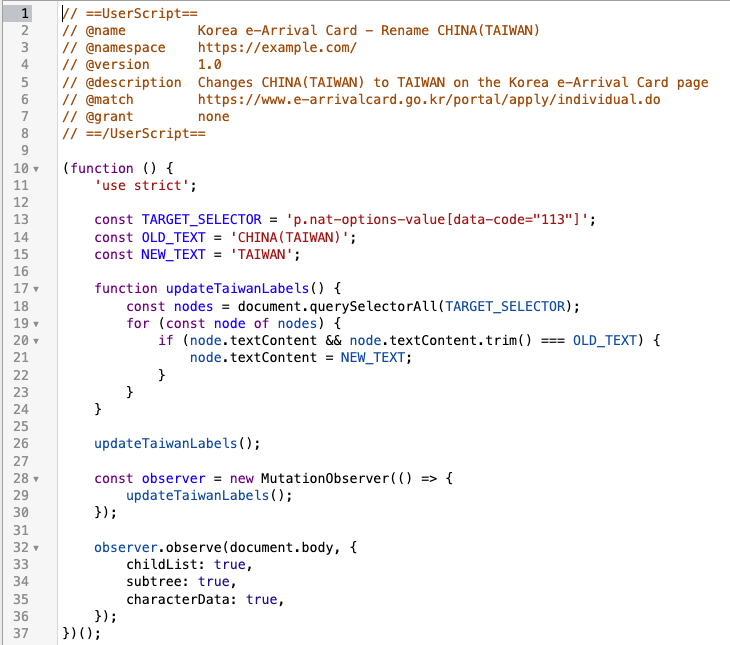
Tampermonkey script to change "CHINA(TAIWAN)" to "TAIWAN"
The script does three simple things. First, the @match line restricts it to the exact e-Arrival Card page, so it doesn’t roam all over the web like a tiny geopolitical enforcer gremlin. Second, it looks for <p> elements with the CSS class nat-options-value, the country code 113, and the Korean label 타이완, which together make the selector nicely specific. Third, whenever it finds text that exactly says CHINA(TAIWAN), it replaces it with TAIWAN.To use it, get the Tampermonkey browser extension, create and save the script, and reload the page. And Booyah.
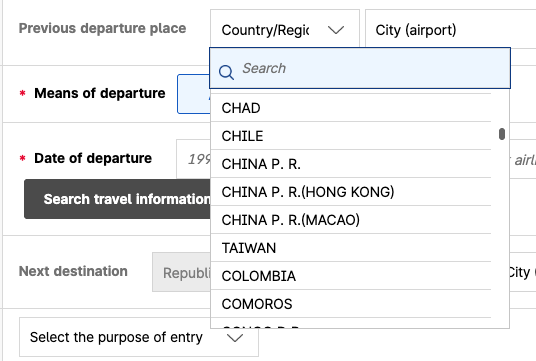
Fixed dropdown
On a More Serious Note
Even if this is a small, local hack, it highlights a broader issue: Why don’t more websites make use of contextual signals like IP address, display language, or browser locale to mitigate these conflicts? Even imperfect localization could reduce diplomatic friction and user frustration.
Interface text is rarely just interface text. In today’s tense world, small labels on dropdowns, forms, and menus can carry outsized meaning, and that importance is only going to grow (“Gulf of America”, anybody?). Thoughtful, context-aware UI design — even if it’s only partially effective — is worthy of respect. Sometimes, when the designers don’t provide that, a little browser-side hack is an effective way to make the experience feel right.
